AI Integration (MCP)
Connect your Kerjoo data to ChatGPT, claude.ai, or another AI app, then ask about attendance, leave, permits, and overtime right from the chat.
AI Integration connects Kerjoo to the AI apps your company already uses, such as ChatGPT, claude.ai, Claude Desktop, Claude Code, Cursor, or OpenCode. The connection uses MCP (Model Context Protocol), an open standard for connecting AI apps to data sources.
Once connected, just ask in everyday language, for example:
- "Which employees were late last week?"
- "Which leave and permit requests are still waiting for approval?"
- "How many leave days does Rina have left?"
- "Approve Rina's leave for November 26–27."
The AI reads data directly from Kerjoo, limited to what your account is allowed to see, and summarizes it in its answer.
Who Can Use It
- Admins and sub-admins. Employees cannot use AI Integration. A sub-admin only sees data within the permissions given to them.
- Subscribed companies with an active package (Basic, Pro, Advance, or Master). During the trial period, or after the subscription ends, AI Integration sign-in is refused.
Kerjoo Server URL
This is the server URL you paste into your AI app:
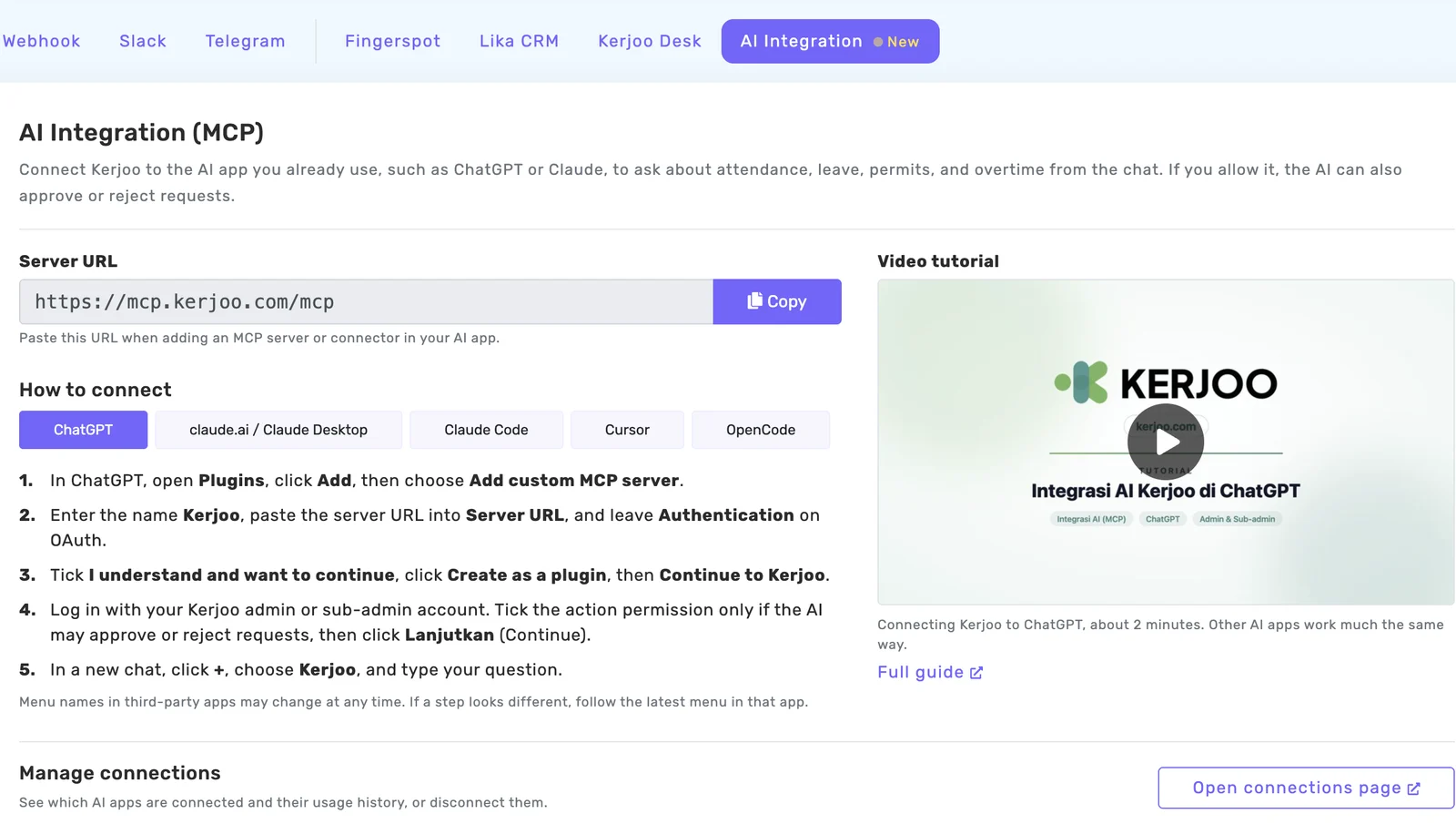
https://mcp.kerjoo.com/mcp
The same URL is also in the Kerjoo Admin Panel, under Integration, AI Integration tab, together with a Copy button, the steps to connect each app, a video tutorial, and a button to the connections page.
Data the AI Can Read
The AI can read, among other things:
- company profile and divisions;
- employee data, positions, and work schedules;
- attendance;
- leave, permits, overtime, and claims;
- client visits and sales;
- projects and tasks;
- performance reviews;
- announcements;
- the Kerjoo user guide.
The full list appears on the consent screen when you connect an AI app.
Sensitive data is never sent to the AI:
Salaries, bank accounts, national ID and tax numbers, addresses, employee phone numbers and emails, photos/selfies, GPS locations, devices, and attachments are never sent to the AI app.
Data the AI reads is sent to the AI app provider and processed under that provider's policies. Only use AI Integration with AI apps your company has approved.
Approving or Rejecting Requests
By default the AI can only read data. When connecting, you can tick an extra permission so the AI can also approve or reject requests:
- leave and permits (daily and hourly);
- attendance reviews and revisions;
- attendance limit unlock requests;
- employee devices, profile photos, and Pintu Kerjoo attendance;
- overtime, overtime schedules, and claims.
Approval rules still apply exactly as in the Admin Panel, such as the remaining leave check and multi-level approval. Employees also get notified as usual. Other data, such as employee data, schedules, or payroll, cannot be changed through the AI.
Usage Limits
| Limit | Value |
|---|---|
| AI calls to Kerjoo per company per day | Basic 200, Pro 1,000, Advance 1,000, Master 5,000 |
| Approve/reject actions per user | 30 per hour |
| Connection validity | 30 days, then reconnect from the AI app |
The daily quota resets at 00:00 WIB (UTC+7). One question may use several calls, depending on how much data the AI needs to read. Today's remaining quota is shown on the connections page.
Next Steps
- Connecting ChatGPT: a full illustrated guide, from adding Kerjoo to approving requests.
- Other AI Apps: claude.ai, Claude Desktop, Claude Code, Cursor, and OpenCode. The steps are much the same.
- Manage Connections: see connected apps and usage history, and disconnect.