Manage Connections
See which AI apps are connected to Kerjoo, the usage history, today's remaining quota, and how to disconnect.
The connections page lists every AI app connected to Kerjoo, along with its usage history. Open it in either of these ways:
- From the Integration menu, AI Integration tab, click Open connections page.
- Go straight to
https://mcp.kerjoo.com/connections, then sign in with a Kerjoo admin or sub-admin account.
The page is in Indonesian. This guide gives the English meaning of each part.
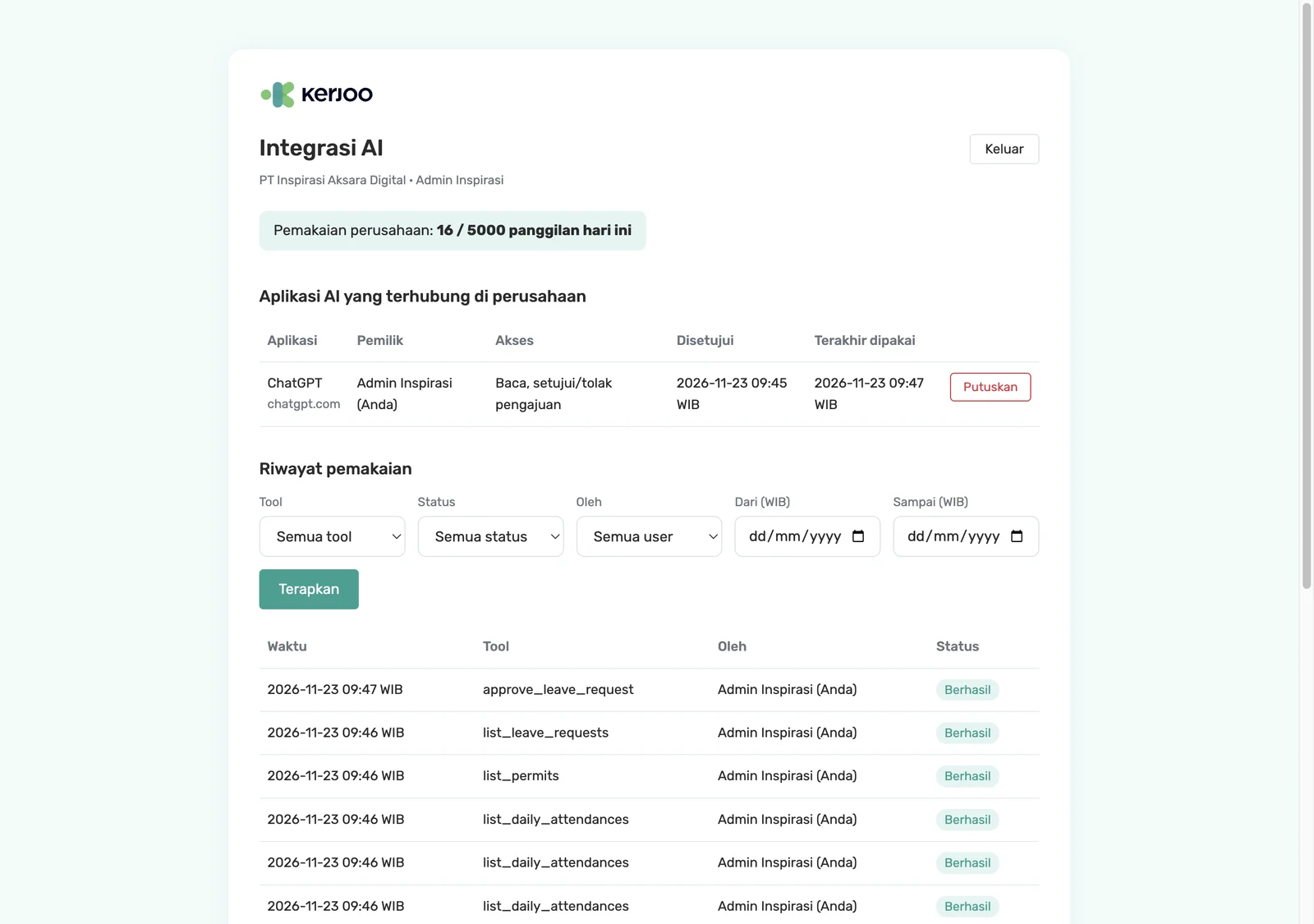
Today's Usage
The top of the page shows the company's calls today against the package quota, for example 16 / 5000 panggilan hari ini (16 / 5000 calls today). The quota resets at 00:00 WIB (UTC+7). See the limits in AI Integration.
Connected AI Apps
The Aplikasi AI yang terhubung (Connected AI apps) table lists each connection with:
- the app name, such as ChatGPT or Claude;
- its owner, meaning the Kerjoo user who connected it;
- its access: Baca (Read), or Baca, setujui/tolak pengajuan (Read, approve/reject requests);
- when it was approved and last used.
Admins see every connection in the company. Sub-admins only see their own.
Disconnecting
Click Putuskan (Disconnect) on the app's row. That AI app immediately loses access to Kerjoo data. To use it again, reconnect from the AI app.
If you no longer use it, also remove Kerjoo from the AI app itself (in ChatGPT: the Plugins menu) so it no longer shows up in the tools list.
Changing Permissions
Read-only or approve/reject permission is chosen when connecting. To change it, disconnect, then reconnect from the AI app and set the permission checkbox on the consent page.
Usage History
Every time the AI reads or changes Kerjoo data, one row is recorded in Riwayat pemakaian (Usage history): the time, the tool name (for example list_leave_requests or approve_leave_request), the user, and the status Berhasil (Success) or Gagal (Failed). The data itself is not stored in the history.
Filter the history by Tool, Status, Oleh (By, admins only), and date range, then click Terapkan (Apply). History is kept for 90 days.
Messages You May See
Kerjoo messages are shown in the language of your account. The English versions are:
| Message | Meaning |
|---|---|
| AI Integration is only available to subscribed companies (not during the trial) | The company is still on trial. |
| The company's subscription has ended | Renew the subscription, then use it as usual. |
| AI Integration is only available to admins and sub-admins | Sign in with an admin or sub-admin account. |
| The AI Integration session has expired | The connection is more than 30 days old. Reconnect from the AI app. |
| The company's daily usage limit has been reached | The package's daily quota is used up. Wait for the reset at 00:00 WIB. |
| The AI Integration change limit has been reached | 30 approve/reject actions within one hour. Try again later. |
| This data is not available to AI Integration | That data is deliberately not exposed to the AI, such as payroll. |
| This Google account is not registered in Kerjoo | Sign in with email and password, or use a Google account with the same email as your Kerjoo account. |