Overtime Settings
Used to manage company policies and rules related to overtime.
Through this page, admins can determine how the system manages overtime attendance, overtime pay calculations, and overtime settings based on divisions.
Within the Overtime Settings menu there are three main tabs, namely Schedule, Overtime Pay Rules, and Division.
Schedule Tab
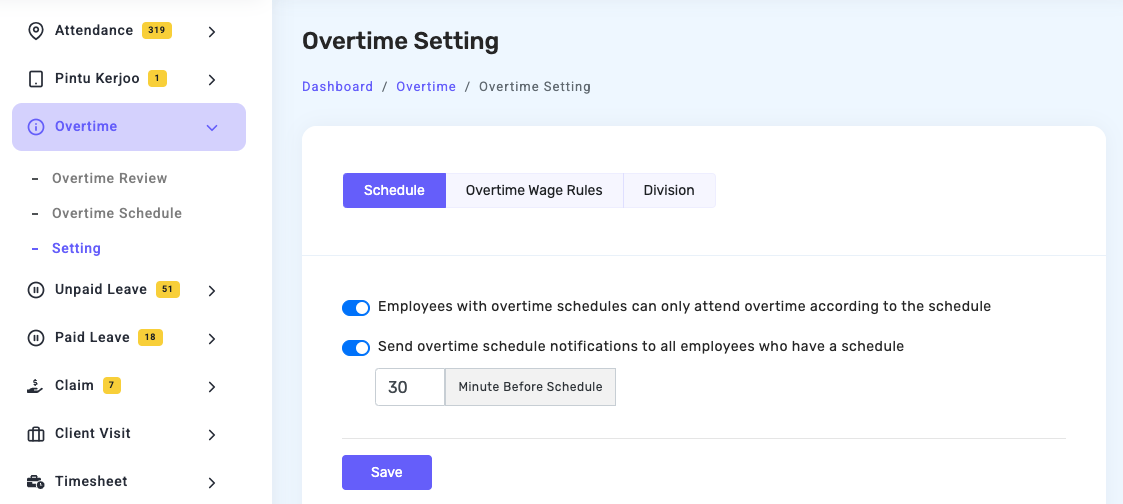
The Schedule tab is used to manage the basic settings related to overtime attendance and notification delivery to employees. Several settings available in this tab include:
- Overtime Attendance Based on Schedule
There is a setting option that allows the company to restrict overtime attendance so that employees with an overtime schedule can only record overtime attendance according to the schedule that has been set. - Overtime Schedule Notification
There is an option to enable overtime schedule notifications for employees who have an overtime schedule. With this feature, employees will receive reminders about their overtime schedule. - Notification Time Settings
Admins can determine how many minutes before the overtime schedule starts the notification will be sent to employees. - Save Button
After making changes to the settings, admins can click the Save button to store the configuration that has been set.
Overtime Pay Rules Tab
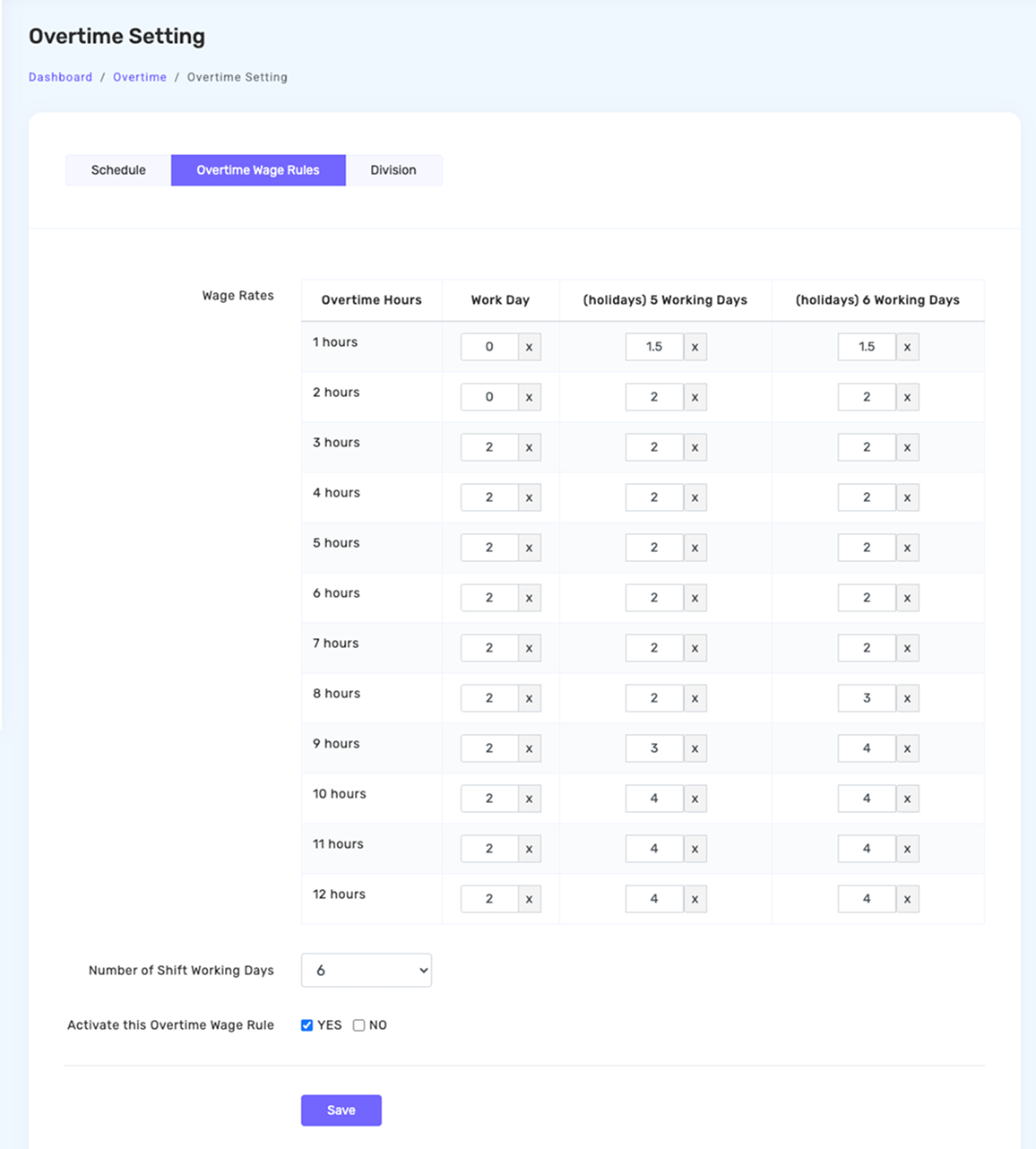
The Overtime Pay Rules tab is used to configure how overtime pay is calculated based on the number of overtime hours worked by employees. On this page there is a configuration table that displays several main components:
- Overtime Hours — displays the duration of overtime calculated in hours, starting from 1 hour up to 12 hours of overtime.
- Pay Rate — each overtime hour can be assigned a specific multiplier value that will be used as the basis for calculating overtime pay.
- Working Day — determines the overtime rate that applies on regular working days.
- Holiday / Working Day — determines the overtime rate that applies on holidays that still fall within a specific working period.
- Holiday / Day Off — determines the overtime rate that applies on full holidays, such as national holidays or company holidays.
- Shift Working Days — determines the number of working days in one shift cycle, which can be selected according to the company's policy.
- Overtime Pay Rule Activation — admins can enable or disable the overtime pay rules that have been created so the system will use those rules when calculating overtime.
- Save Button — stores the configuration that has been set.
Division Tab
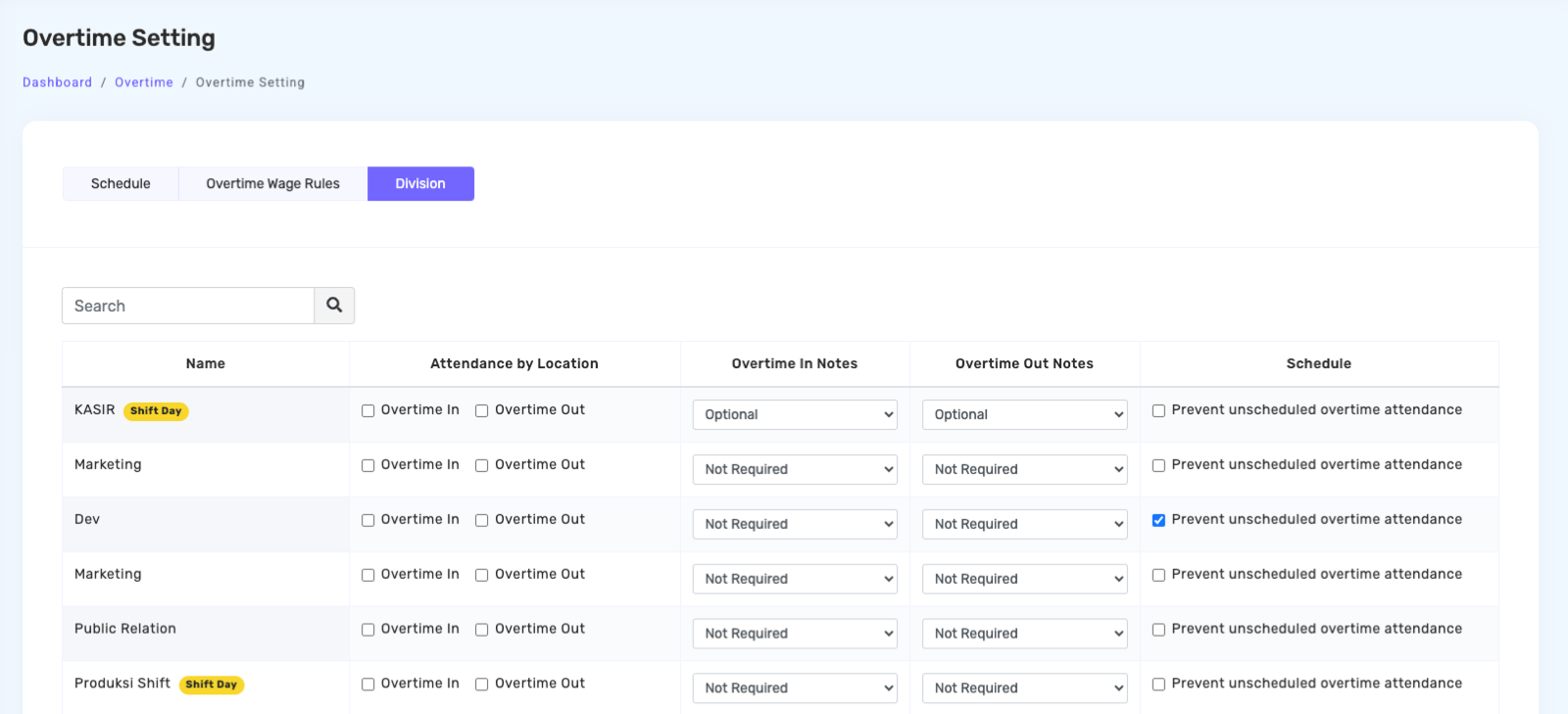
The Division tab is used to manage different overtime policies for each division or department within the company. Several settings available on this page include:
- Search Field — used to quickly find a specific division.
- Division Name — displays the list of divisions or departments within the company.
- Overtime Attendance Process — determines when employees are allowed to record their overtime attendance, namely at Start Overtime and End Overtime.
- Overtime Start Note — determines whether employees are required to enter a note when starting overtime.
- Overtime End Note — determines whether employees are required to enter a note when finishing overtime.
- Overtime Attendance Schedule — determines whether overtime attendance must follow a predefined overtime schedule or can be recorded without a schedule.
With the settings available in the Division tab, companies can customize different overtime policies for each department according to their operational needs.