Paid Payroll
The paid payroll menu is used to manage and monitor the employee salary payment process. Previously, this menu was known as the Paid menu, but it has now been updated to Payments to better represent the overall salary payment management process, from recording payments to monitoring their payment status.
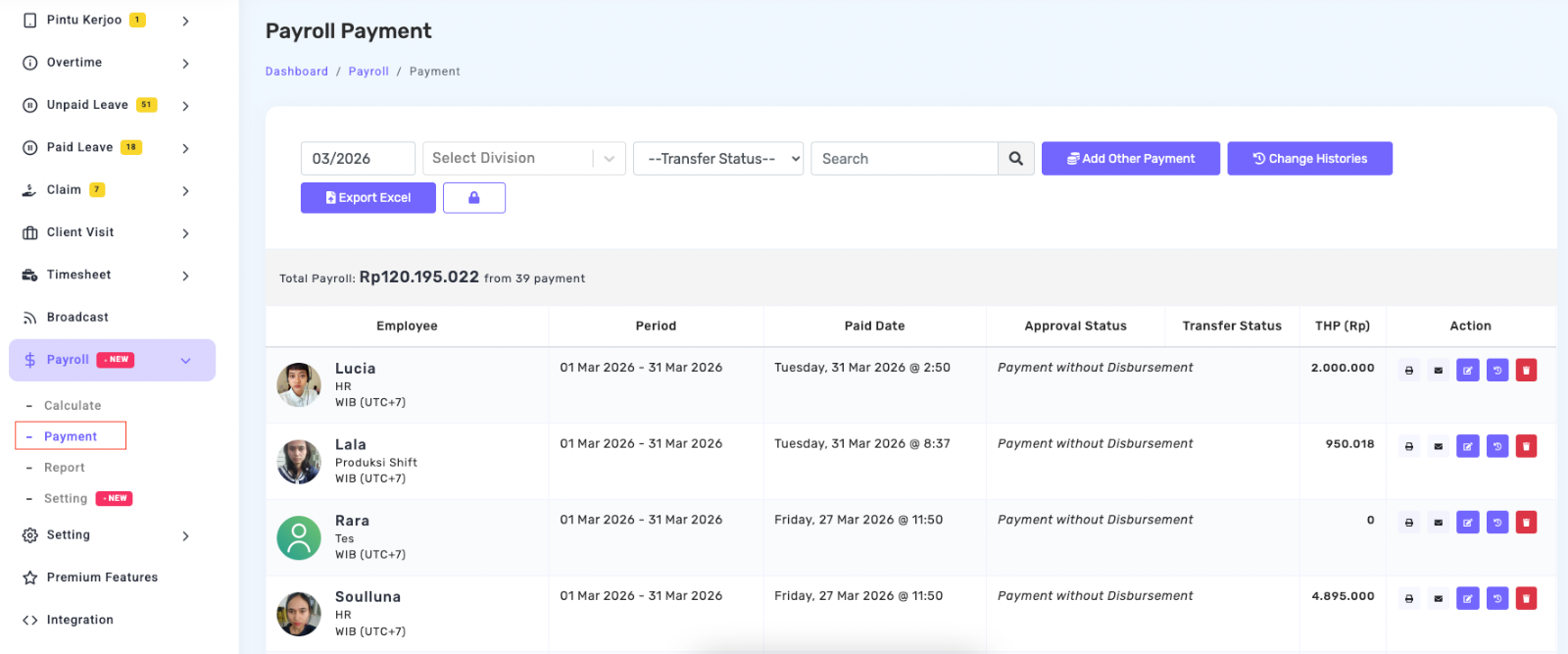
Features Available on the Paid Payroll Page
1. Period Filter
This filter is used to select the month and year of the salary payment period you want to view. With this feature, HR can easily review salary payment history for a specific period.
2. Division Filter
This feature allows users to display payment data based on a specific division, making it easier to manage payroll if the company has multiple departments.
3. Transfer Status
The Transfer Status filter is used to sort data based on payment status, for example whether the salary has already been transferred or is still in process.
4. Search Field
The search field helps HR or admins quickly find employee payment data by entering the employee’s name or other related information.
5. Payment Data Table
The table displays important information related to salary payments, such as employee name, salary period, payment date, approval status, transfer status, and THP (Take Home Pay) amount.
This information helps HR monitor whether the payment has been processed or not.
Icon Description on the Paid Payroll Page
 Export Excel
This feature can export employee salary data from the Kerjoo system to Excel. Page Password
Used if the panel admin is more than one person to minimize fraud and double protection so that not all admins can access it. If the panel admin forgets the password, please get in touch with the Kerjoo team so that the password can be reset immediately. Add Other Payment
This feature allows HRDs to add information on other payments made to their employees in addition to the payments in the bulk action menu. Change Histories
This feature contains information related to changes in payroll data that has been paid.