Admin Notifications
Admin notifications through Slack or Telegram allow administrators to receive real-time updates from the Kerjoo panel, even when not logged into the system.
This feature purpose to help you manage activities on the Kerjoo admin panel in real-time, enabling you to respond to employee requests more quickly without worrying about missing important information.
Choose Slack or Telegram as your platform to continue receiving notifications from the Kerjoo admin panel, even when you are not directly accessing it.
Notification List
- Automatic Leave
- Early Departure
- Attendance Change Requests
- Extended Breaks
- Permission to Adjust Work Hours
- Hour Adjustment Requests
- Special/Annual Leave Requests
- Day-Off Requests
- Adding New Documents for Day-Offs
- Profile Picture Change Requests
- Auto Clock-Out Employee List
- Claim Submissions
- Document Expired Reminders
- Subscription Expired Reminders
- Subscription Renewal Orders
- Attendance Review
- Shift Rotation Requests
- Attendance Approval
- Plan Upgrades
- Device Registration Requests
To enable notifications, access the menu Settings > Admin Notifications.
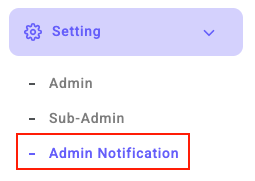
-
For Slack :
- Select Slack Notifications
- Get Webhook

- Enter the Webhook URL into the admin panel

- Activate

- Save

- Select Slack Notifications
-
For Telegram :
- Select Telegram Notifications

- Get Telegram ID with Kerjoobot

- Enter the ID

- Activate.
- Save
- Select Telegram Notifications