Sub Admin - Admin Permission
Used to add Sub Admins without allowing full access to the Kerjoo admin panel. This feature allows you to limit and customize access according to each admin's responsibilities.
This feature is designed to assist the main admin in delegating tasks to supervisors or relevant admins, making the main admin’s work more organized and efficient. Additionally, a clear division of roles can enhance team productivity while maintaining company data security.
To use this menu, first add Sub Admin role management through:
- Go to the Settings tab > Sub Admin
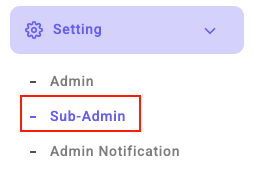
- Click Add Role Management


- Enter the Sub Admin role name, e.g., Financial Admin

- Checklist the Sub Admin feature access

- Click Save

Once the role is successfully saved, add a Sub Admin by:  Entering the new admin's email address and password. Click Save.